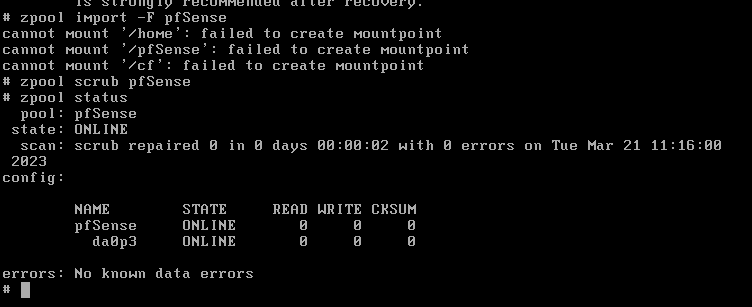
So you’ve got a pfsense device with a zfs root that probably got rebooted unexpectedly and now won’t boot? If this is your situation, read on for directions on how to get back up and running quickly without a reinstall.
ZFS Boot error due to pool issue
You will need to use the pfSense installation environment to fix this. Create a USB Memstick and boot your pfSense device into Single User mode on the memstick (boot option 2).
Single user is your friend here
Use the following commands once the device is booted into single user mode from the memstick:
#list detected zfs pools. Default pool is pfSense
zpool import

#zpool soft import (this will probably fail)
zpool import -f (pool name, case-sensitive)

#example import for zpool named pfSense:
zpool import -f pfSense

#zpool force import
zpool import -F (pool name, case-sensitive)

#example force import for zpool named pfSense:
zpool import -F pfSense

#it's a good idea to run a scrub after the recovery:
zpool scrub (pool name, case-sensitive)
I started running into an issue within the last few months where one VLAN on my pfsense had lost the ability to ping to internet destinations, and clients connected to that subnet were unable to connect to several different types of VPN connection. Other interfaces on the same firewall were able to ping internet destinations without an issue.
After troubleshooting the ruleset, I eventually came to the conclusion the rules definitely were not the issue as there was nothing blocking ICMP outbound. Packet captures looked as expected on the WAN interface (ICMP echo and reply flowing normally). On the internal interface, I would see the ICMP echo sending out, but no reply was present.
I started troubleshooting installed packages on the device, which eventually lead me to this topic identifying that the issue is with the Captive Portal feature (which was enabled on the affected interface).
Solution:
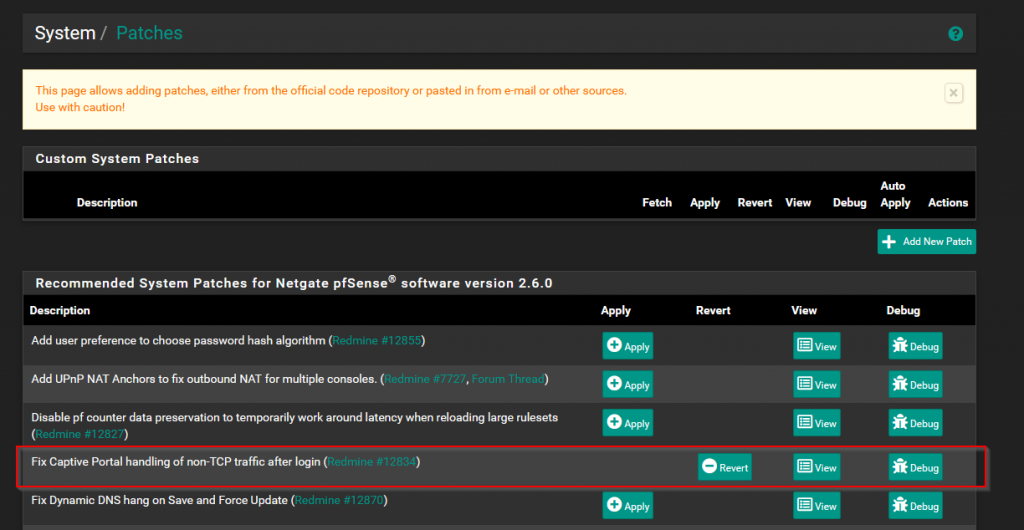
I installed the System Patches v2.0 package. Once the package was installed, I went under the System > Patches menu option and enabled the Fix Captive Portal handling of non-TCP traffic after login option.
After a reboot of the firewall, the issue was resolved!
I’m posting this quick write-up in hopes that it helps others running into the this issue!